Nest
Key takeaways
- Use one list that every family member can add to from their own phone.
- Add items the moment something runs out.
- Include quantities so nobody has to guess.
- Keep separate lists for different stores or occasions.
The paper list on the fridge has one big problem: it stays on the fridge. The person at the store cannot see it, and the person at home cannot add to it once someone has left. A shared digital shopping list fixes both.
Why a shared family shopping list works
- No double buying. Everyone can see what is already on the list and what has been bought.
- Fewer forgotten items. Things get added when they run out, not when someone remembers.
- Anyone can do the shopping. The list is on every phone, so whoever is nearest can go.
- Less back and forth. No more “do we need eggs?” messages from the supermarket.
How to set up a shared shopping list in five steps
- Pick one app the whole family can use. It should work on both iPhone and Android and update for everyone at once.
- Invite everyone who shops or cooks. Partners, older children and anyone else who lives with you.
- Agree one simple rule: if you finish something, add it to the list straight away.
- Add quantities. “Milk ×2” is clearer than “milk”.
- Tick items off at the store so everyone can see what is done.
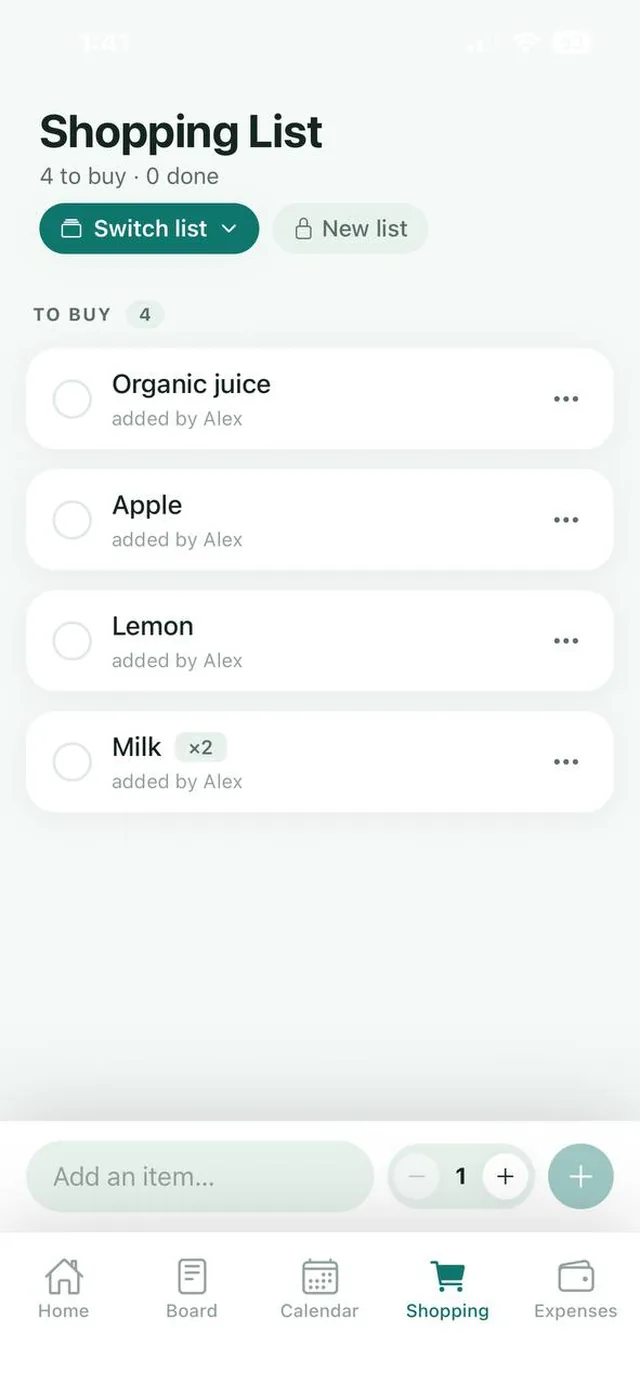
Tips to make your shared list stick
Use separate lists for separate trips
A weekly supermarket list, a list for the hardware store and a list for an upcoming party keep things tidy. Switch between them depending on where you are going. In Nest, multiple lists are part of Nest Premium.
Connect the list to your meal plan
The best shopping lists come from a plan. When you plan the week’s meals, add their ingredients to the list in one go. See our weekly meal planning guide.
Clear the list after each trip
Tick off or archive what you bought so the list only shows what is still needed. A cluttered list gets ignored.
Make it easy for children to help
Older children can add what they need for school or packed lunches. It teaches them to notice when things run out, and it saves you a job.
Sharing a shopping list with your partner
For couples, a shared grocery list removes one of the most common small frustrations at home: the forgotten item and the “I thought you were getting it” conversation. Whoever passes a store can check the list and pick things up. See how Nest works for couples.
The bottom line
A shared shopping list is one of the quickest wins in family organization. Choose one app, agree to add things the moment they run out, and tick items off as you shop. Within a week, double buying becomes a thing of the past.
Track what the shop costs
A shared list stops double buying. It also makes it easy to see how much the family spends on food. After the shop, add the total to Nest’s Expenses under Groceries, and choose Split with the family or Just record it.
- Nest suggests the category as you type, so “Costco” becomes Groceries.
- The Overview shows the month so far, how it compares with last month and a chart of where the money went.
- With Nest Premium you can set a Groceries budget, and the family is told at 80% and when it is passed.
Frequently asked questions
How can my family share a shopping list?
Use a shared shopping list app that every family member can open on their own phone. Items added by anyone appear for everyone, and ticking them off at the store updates the list for the whole family.
Can I share a grocery list between iPhone and Android?
Yes, as long as you use an app available on both. Nest is available on the App Store and Google Play.
Can I have separate shopping lists for different stores?
Yes. With Nest Premium you get unlimited shopping lists. Use Switch list to move between them and New list to create another, for example for the hardware store or a party.