Nest
Key takeaways
- A family command center is one shared place for the calendar, lists, meal plan, chores and messages.
- It needs six parts: calendar, meal plan, shopping list, chores, notices and key contacts.
- A wall center is great at home. A digital command center goes with you to the store, work and school.
- It only works if everyone checks it daily and anyone can add to it.
A family command center is a single, central place where a household keeps its schedule, to do lists, meal plan and important messages. Traditionally it is a wall near the kitchen or the front door with a calendar, a whiteboard and a few folders. Today it is just as often an app that the whole family shares.
What goes in a family command center
| Part | What it answers | On the wall | On your phone |
|---|---|---|---|
| Calendar | What is happening, and when? | Monthly wall calendar | Shared family calendar |
| Meal plan | What is for dinner? | Weekly menu board | Meal planner |
| Shopping list | What do we need? | Notepad or whiteboard | Shared shopping list |
| Chores | Who is doing what? | Chore chart | Shared task list |
| Notices | What does everyone need to know? | Cork board or whiteboard | Family notice board |
| Key contacts | Who do we call? | Printed phone list | Shared contacts |
Option 1: A wall command center
Pick a spot everyone passes every day, usually the kitchen, hallway or mudroom. You need less than you think:
- A large monthly calendar, with one pen color per person if you like
- A whiteboard for the meal plan and notes
- A notepad or section of the board for the shopping list
- A chore chart at child height
- A folder or clip per person for school papers and mail
- Hooks for keys and bags
The strength of a wall center is that it is always on show. The weakness is that it stays on the wall. You cannot check it from the store, and updating it is a job for whoever happens to be home.
Option 2: A digital family command center
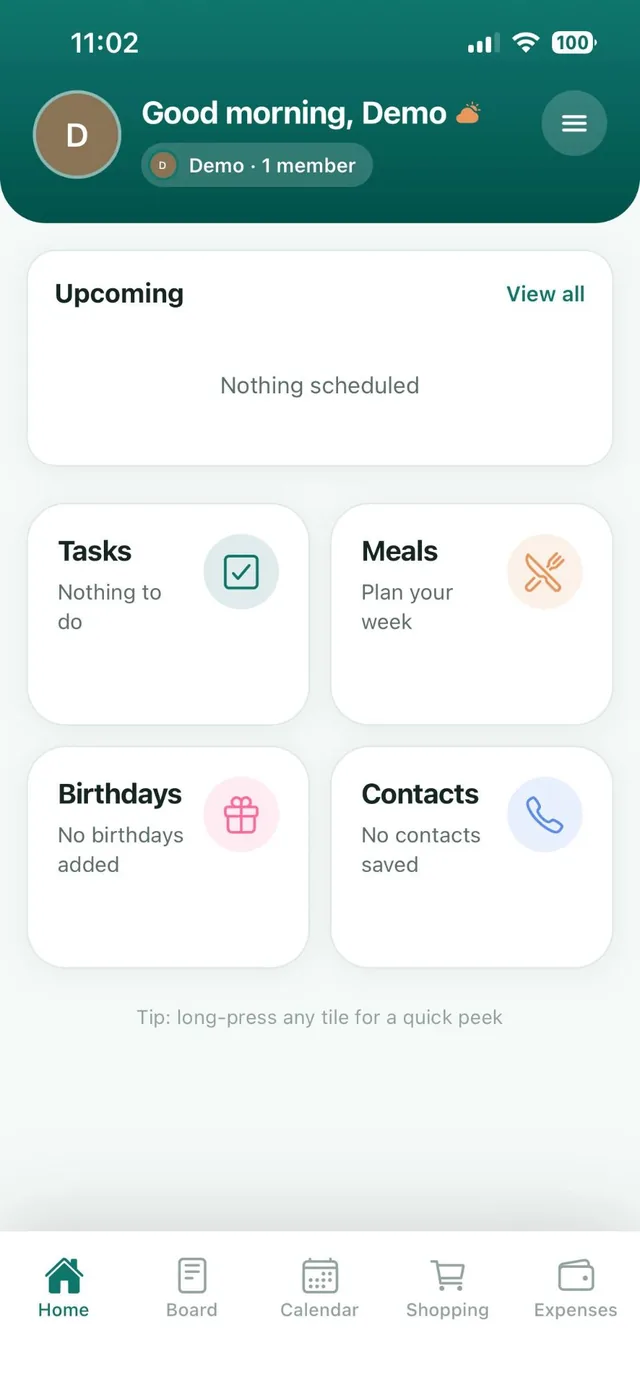
A digital command center puts the same six parts in an app on every family member’s phone. Changes sync for everyone, so the list you check at the store is the list someone updated five minutes ago at home.
You can assemble one from separate apps, such as a calendar app, a notes app and a group chat, but families tend to stop checking when the information is spread across four places. A single family organizer app keeps it together.
Option 3: Use both
Plenty of families run a hybrid. The app is the source of truth, and a simple board in the kitchen shows this week’s dinners and a sticker chart for young children. Update the app first, and let the wall be the highlights.
How to set it up in one evening
- Choose the place. One wall, one app, or both. Not three calendars.
- Add the next four weeks. School dates, work shifts, activities, appointments and birthdays.
- Plan this week’s dinners and build the shopping list from the plan. Our weekly meal planning guide shows how.
- List the regular chores and agree who owns each one. See how to make a chore chart.
- Save the numbers everyone needs: school, doctor, dentist, a neighbor.
- Show everyone. A five minute tour so the whole family knows where things live.
Habits that keep it working
- Check it every morning. Thirty seconds is enough.
- Add things the moment you hear about them.
- Everyone adds, not just one parent.
- Reset it on Sunday: clear the old week and plan the new one.
The bottom line
A command center is not about pretty labels. It is about one trusted place that answers the questions families ask every day: what is happening, what is for dinner, what do we need and who is doing what.
Add a money panel
A command center needs a place for money. In Nest the spending card on Home shows the month so far and how it compares with last month, and the Expenses tab holds the detail.
- Expenses has four tabs: Overview, Recent, Balances and Bills.
- Premium families also see the single most important line on Home: a budget that has been passed, then a bill that is due, then the top insight.
- Tap the card to open Expenses.
Frequently asked questions
What is a family command center?
A family command center is one central place where a household keeps its calendar, meal plan, shopping list, chores and important messages, so everyone can see what is happening. It can be a wall in your home, a shared app, or both.
What should a family command center include?
Six things: a calendar, a weekly meal plan, a shopping list, a chore list, a place for notices and a list of key contacts.
What is a digital family command center?
A digital family command center is a shared app that holds your family’s calendar, lists, meal plan, chores and notices on everyone’s phone, synced so every person sees the same information.
Where should I put a family command center?
Put a wall command center where everyone passes daily, such as the kitchen, hallway or mudroom. A digital one lives on each family member’s phone.
What is the best app for a family command center?
Look for one app that covers the calendar, lists, meals, chores and family messages. Nest: Family Organizer includes all of these plus birthdays, contacts and shared expenses, and is free for up to 3 family members.