 Nest
No ads, so no advertisers
Nest has no ads on any plan. There is no ad network in the app and no reason to build an advertising profile of you.
No ads, no bank connection and only one permission to grant: notifications. Nest stores what it needs to run your family’s shared space, and it does not sell your information.
Free for up to 3 family members. No ads on any plan.
Nest is the ad-free family organizer for shopping lists, chores, meals, a calendar and family budgets.
Nest has no ads on any plan. There is no ad network in the app and no reason to build an advertising profile of you.
Nest needs your permission to send notifications and nothing else. It does not read your contacts, and it never reads your existing calendar entries.
Nest does not connect to your bank. You add expenses yourself, and Nest does not collect or store credit card or bank account numbers.
A family organizer knows when you are home, what you eat, who you owe and what you spend. That is exactly the kind of information that should stay with your family.
Many free apps pay their way with advertising, which is why they collect more than they need. Nest is paid for by families who choose Nest Premium, so it has no reason to. It stores your account details, the content your family adds and basic crash diagnostics, and its privacy policy states that it does not sell your personal information.
Privacy is also a habit, not only a policy. Nest gives you simple controls: you decide who joins your family, you can reset an invite in one tap, and each kind of notification has its own switch. See how Nest protects your family’s information, and read the full privacy policy, last updated May 22, 2026.
The facts below come from Nest’s privacy policy and the app itself.
| Ads | None, on the free plan and on Premium |
|---|---|
| Selling your information | No. The privacy policy says Nest does not sell your personal information |
| Bank connection | None. You add expenses yourself, and Nest does not collect or store credit card or bank account numbers |
| Phone permissions | Notifications. Calendar access only if you choose Add to phone calendar |
| Contacts and calendar entries | Nest does not read your device contacts or your existing calendar entries |
| What Nest stores | Your email, a hashed password, your display name, a phone number only if you give one, the content your family adds, crash diagnostics and subscription status |
| Who sees family content | The members of your family. Admins approve and remove members |
| Services that help run Nest | Supabase (database and sign in), RevenueCat (subscriptions), Sentry (crash reports), Apple and Google (app stores and payments). They process data on Nest’s behalf and may not use it for their own purposes |
| Protection | Encryption of data in transit, and access controls that restrict each family’s data to its own members |
| Deleting your data | Contact us with a deletion request. Nest deletes or anonymizes personal data within a reasonable period, except where it must keep certain information by law |
Phones ask before an app can use anything beyond its own storage. This is what Nest asks for.
| Permission | Nest asks | Why |
|---|---|---|
| Notifications | Needed | Shopping list updates, calendar reminders, tasks, bills and budget alerts. Each kind has its own switch in Nest. |
| Calendar | Optional | Only if you turn on Add to phone calendar. It is a one way sync: Nest adds the events you choose to your phone’s calendar and does not read your existing calendar entries. |
| Contacts, location, camera, microphone, photos | Not asked | Nest does not need them. The Contacts tile keeps your family’s numbers inside Nest. |
A link from an admin lets people join straight away, and the family code needs an admin’s approval. Share only with people you trust.
See how Reset if a link escapesTap Reset code and links and the current code and every link you shared stop working.
See how Review who is in the familyAdmins can approve, remove and change roles under Members.
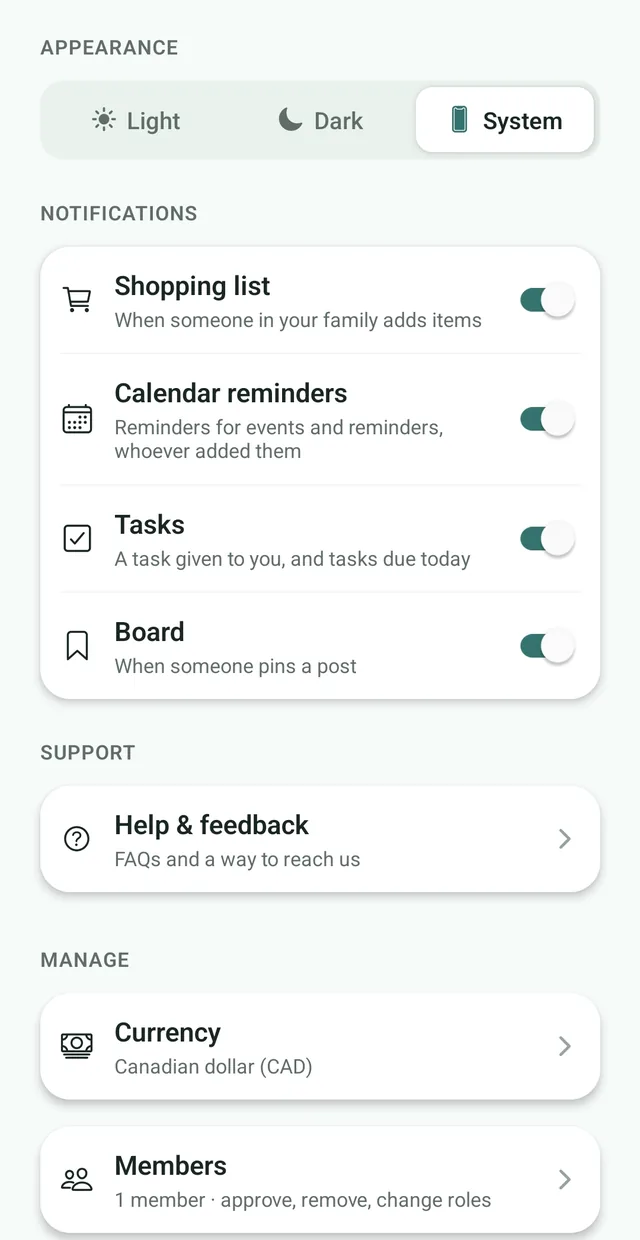
See how Choose your notificationsEach kind has its own switch, so you decide what reaches your lock screen.
See howNest is built to keep your family’s information with your family. It has no ads, does not connect to your bank, needs only permission to send notifications and, according to its privacy policy, does not sell your personal information. Content you add is visible to the members of your family, and access controls restrict each family’s data to its own members.
Nest needs permission to send notifications. If you choose Add to phone calendar, your phone also asks for calendar access. It is a one way sync: Nest adds the events you choose and does not read your device contacts or your existing calendar entries.
No. Nest’s privacy policy states that it does not sell your personal information. The services that help run Nest, such as database hosting, subscriptions and crash reports, process data on Nest’s behalf and are not permitted to use it for their own purposes.
No. Nest has no ads on the free plan or on Premium.
No. Nest does not connect to banks, so there is no bank login to share. You add expenses yourself, and Nest does not collect or store credit card or bank account numbers.
Nest stores your email address, a password in hashed form, your display name, a phone number only if you choose to give one, the content your family adds such as notices, events, shopping lists and expenses, basic crash diagnostics and your subscription status.
The members of your family. Admins can approve and remove members, and access controls restrict each family’s data to its own members.
Nest names Supabase for database hosting and sign in, RevenueCat for subscriptions, Sentry for crash reports, and Apple and Google for app distribution and payments.
Contact us with a deletion request, using the contact details in the privacy policy. Nest deletes or anonymizes your personal data within a reasonable period, except where it is required to keep some information for legal, accounting or fraud-prevention reasons.

Free for up to 3 family members. No ads, and only one permission to grant.