 Nest
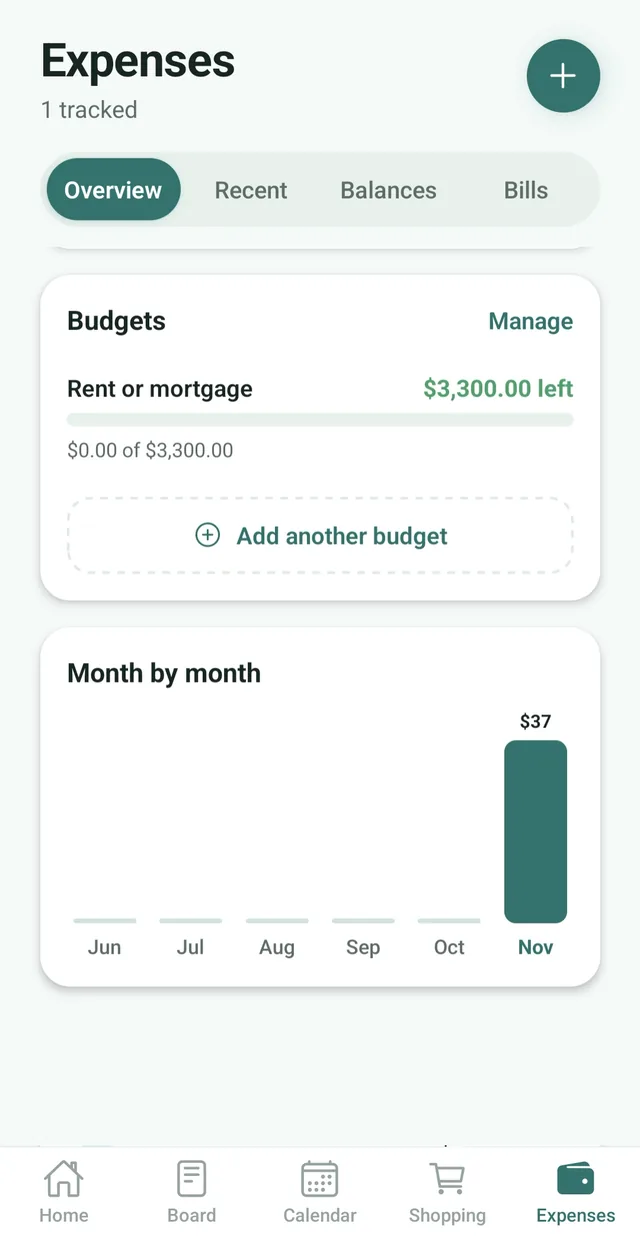
Budgets by category
Set a monthly amount for each category, plus one optional amount for the whole month. Nest counts expenses against them as they come in.
Set a monthly budget for the family or for each category, get a heads-up at 80% and keep track of the bills that come round every month.
Free for up to 3 family members, with no ads. Available on iPhone and Android.
Set a monthly amount for each category, plus one optional amount for the whole month. Nest counts expenses against them as they come in.
The family is told when a budget reaches 80% and if it is passed, so there are no surprises at the end of the month.
Add each bill with its due date and how often it repeats. The family gets a reminder on the day it is due.
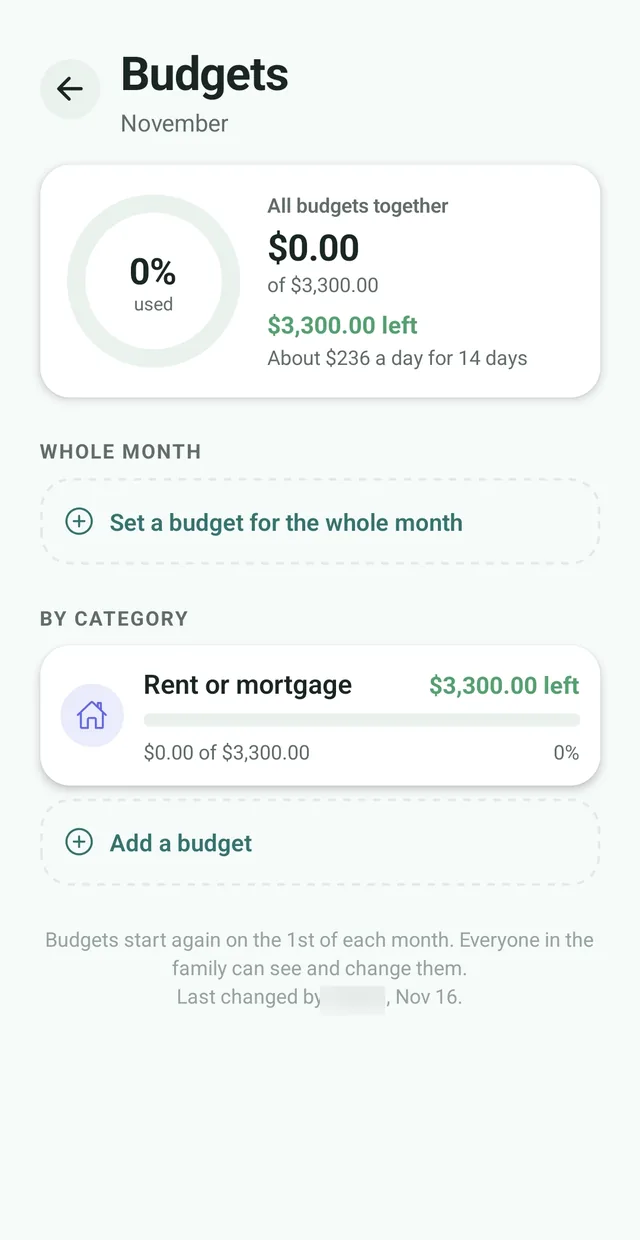
A budget only works if everyone knows about it. In Nest the budgets are shared: anyone in the family can set or change them, and everyone sees the same progress. Budgets start again on the 1st of each month, and on the 1st you get a summary of last month’s spending.
A color shows how close each budget is. Under 80% it looks normal, from 80% it turns amber, landing exactly on budget shows green, and going over turns red. The family is told once when a budget reaches 80% and once if it is passed, and the whole-month budget shows about how much you can spend each day for the rest of the month.
For payments that come round every month, open the Bills tab and add each bill with its due date, how often it repeats and, if you like, the amount. The family gets a reminder at 9 am on the day it is due. When it is paid, tap Mark paid: the payment is added to Recent and to that month’s total, and a repeating bill moves to its next due date. You can split the payment with the family or record it as your own.
Insights compare the month with the family’s usual spending, for example “Groceries are 18% above your usual”, with a forecast for the month, and a chart shows the last six months. They get more useful after a few months of data and give figures and comparisons, not advice. Budgets sit alongside family expense tracking, which is free.
See what is left for the month together, so money talks start from the same numbers.
See Nest for couples For busy parentsKeep groceries, kids and bills in one shared place instead of in one parent’s head.
See Nest for busy parents For roommatesTrack the house bills and a shared budget where everyone can see them.
See Nest for roommatesNeed more detail? The Nest Help Center has step by step guides.
Tap the Expenses tab and stay on Overview.
Tap Set a budget, choose a category such as groceries or rent and enter how much you would like to spend on it each month. Or set one amount for the whole month.
Progress rings and colors show how close each budget is, and Nest tells the family when one is nearly used or passed.
Yes. On the Overview tab, tap Set a budget, choose a category and enter how much you would like to spend on it each month. You can also set one amount for the whole month. Nest counts expenses against it, shows what is left and tells the family when a budget reaches 80% and if it is passed.
Budgets, budget alerts, Bills, insights, the month-by-month chart and who paid what come with Nest Premium, which costs $2.99 a month or $24.99 a year for the whole family. Expense tracking, Balances and your currency are free.
Yes. Along with a budget for each category, you can set one amount for everything the family spends in a month.
Yes. The family is told when a budget reaches 80%, and again if it is passed, once per budget per month. Exactly on budget shows green and sends no alert.
Budgets start again on the 1st of each month, and on the 1st you get a summary of last month’s spending.
Yes. Anyone in the family can set or change a budget.
Open Expenses and tap Bills. Add each bill with its due date, how often it comes round and, if you like, the amount. When it is paid, tap Mark paid: the payment is added to Recent and to that month’s total, and a repeating bill moves to its next due date. You can split a payment with the family or record it as your own. Bills come with Nest Premium.
Yes. The family gets a reminder at 9 am on the day a bill is due, in the family’s time zone. You can switch these on or off under Bills in your notification settings.
Insights compare the month with your family’s usual spending, for example Groceries are 18% above your usual, and give a forecast for the month. They get more useful after a few months of data, and they give figures and comparisons rather than advice. Insights come with Nest Premium.
No. Nest does not connect to banks. You add each expense yourself, and Nest suggests a category as you type, so it takes a few seconds.
Yes. A family admin picks the currency on the Family screen under Manage, from more than 50. Amounts in Expenses, Bills and Budgets use it, and nothing is converted.
No. Nest has no ads anywhere in the app, including the budget and bills tracker, on the free plan or on Premium.
Nest has no ads and does not connect to your bank. It needs only permission to send notifications, and its privacy policy states that it does not sell your personal information. Content you add is visible to the members of your family.

Free for up to 3 members, with no ads. Download it today on iPhone or Android.