 Nest
Family only access
Access controls restrict each family’s data to its own members, and your admins decide who joins.
Your family’s lists, plans and spending are private. Nest encrypts data in transit, restricts each family’s data to its own members, stores passwords only in hashed form and does not ask for your bank login.
Last checked against the privacy policy on November 18, 2026.
Nest is an ad-free and private family organizer, with budgets, lists, chores and a calendar for the whole household.
Access controls restrict each family’s data to its own members, and your admins decide who joins.
Data travelling between your phone and Nest’s servers is encrypted, and passwords are stored only in hashed form.
Nest does not connect to your bank and does not collect or store credit card or bank account numbers.
These are the protections Nest describes in its privacy policy, in plain words. We only list what we can stand behind.
| In transit | Data between the app and Nest’s servers is encrypted. |
|---|---|
| Between families | Access controls restrict each family’s data to its own members, so another family cannot see yours. |
| Passwords | Stored only in encrypted, hashed form, never as plain text. |
| Signing in | Use your email, or Sign in with Apple or Google in one tap. |
| Payments | Handled by Apple or Google. Nest does not collect or store credit card or bank account numbers. |
| Your bank | Nest does not connect to it. You add expenses yourself. |
| Phone permissions | Notifications. Calendar access only if you choose to add events to your phone’s calendar. Nest does not read your contacts or your existing calendar entries. |
| Ads and your data | No ads on any plan, and the privacy policy states that Nest does not sell your personal information. |
| What we keep and why | Your account details, the content your family adds, your subscription status and basic crash diagnostics. |
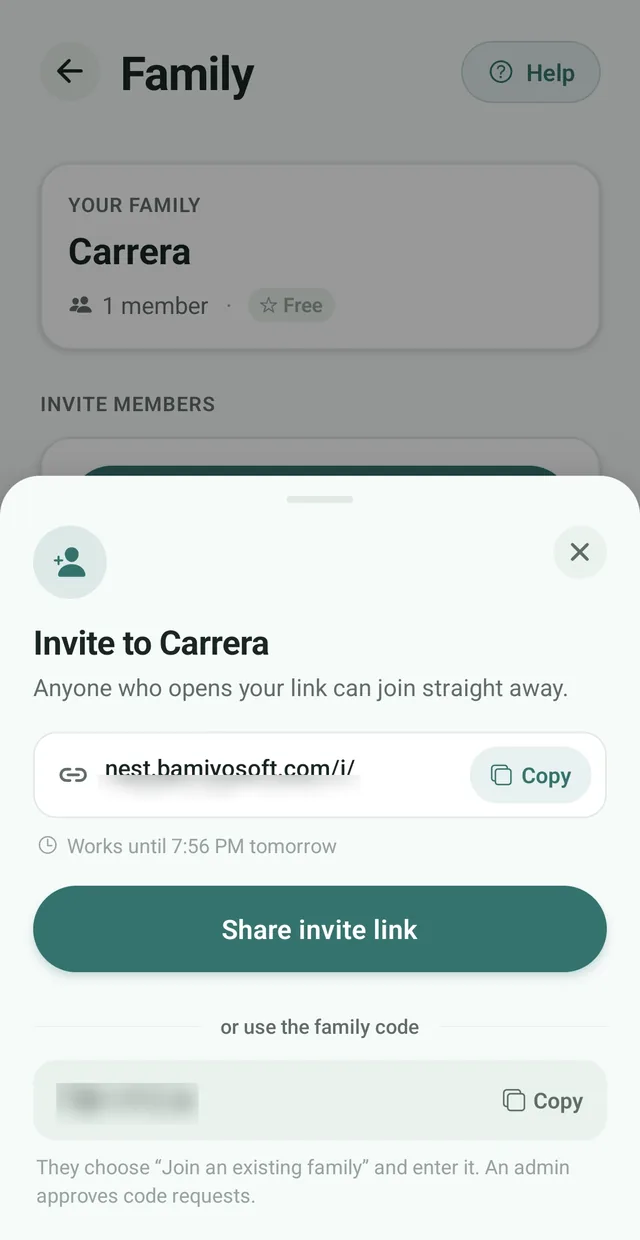
Every invite link works for 24 hours, so an old link cannot be used later.
See how invites work Admins decide who joinsA link from an admin lets people join straight away. The family code, or a link from a member who is not an admin, creates a request an admin approves or declines.
See how approvals work Reset in one tapIf a link ends up somewhere it should not, tap Reset code and links and the current code and every link you shared stop working.
See how to reset Manage membersAdmins can see everyone in the family, remove people and change roles under Members.
See managing members You choose what reaches your phoneEach kind of notification has its own switch, so you decide what appears on your lock screen.
See notification settings Only the payer edits an expenseAnyone can change an expense’s category, but only the person who paid can edit or delete it.
See expensesNest uses a small number of providers. They process data on Nest’s behalf and are not permitted to use it for their own purposes.
| Provider | What it does for Nest |
|---|---|
| Supabase | Database hosting and sign in |
| RevenueCat | Managing your subscription |
| Sentry | Crash reports and basic diagnostics, such as error details, app version, device type and operating system |
| Apple and Google | App store distribution and payments |
No method of transmission or storage is completely secure, so we cannot promise absolute security. Nest’s privacy policy says so, and so do we.
That is why this page describes only protections we can stand behind. When the privacy policy changes, we update this page to match it.
If you think you have found a security problem in Nest, please contact us and put Security in the subject. Tell us what you found and how to reproduce it, and please give us a reasonable chance to fix it before you share details publicly.
For other privacy requests, such as deleting your account and data, contact us the same way and read the privacy policy.
Nest’s privacy policy states that it protects your data using industry-standard measures, including encryption of data in transit and access controls that restrict each family’s data to its own members. No method of transmission or storage is completely secure, so Nest cannot guarantee absolute security.
No. Access controls restrict each family’s data to its own members. Inside your family, content you add is visible to the other members, and admins approve and remove members.
Nest stores your password only in encrypted, hashed form, never as plain text. You can also sign in with Apple or Google instead of using a password.
No. Nest does not collect or store credit card or bank account numbers. Payments for Nest Premium are handled by Apple or Google, and Nest does not connect to your bank.
No. Nest’s privacy policy states that it does not sell your personal information, and Nest has no ads.
Nest names Supabase for database hosting and sign in, RevenueCat for subscriptions, Sentry for crash reports and diagnostics, and Apple and Google for app distribution and payments. They process data on Nest’s behalf and are not permitted to use it for their own purposes.
Open your family settings and tap Reset code and links. The current family code and every link you shared stop working, and invite links expire after 24 hours anyway.
Contact us with a deletion request. Nest deletes or anonymizes your personal data within a reasonable period, except where it must keep certain information for legal, accounting or fraud-prevention reasons.
Use the Contact us link on this page and put Security in the subject. Describe what you found and how to reproduce it, and please give Nest a reasonable chance to fix it before sharing details publicly.

Free for up to 3 family members. No ads, no bank login, and one permission to grant.