Nest
Key takeaways
- Record expenses as they happen, or in one short weekly sitting, not from memory at month end.
- Use a few broad categories and let your tool suggest them.
- Decide for each expense whether it is shared or your own, so nobody owes anyone for personal spending.
- Look at where the money went and compare it with last month, together.
Tracking family spending means writing down what the household spends, so you can see patterns. You do not need a spreadsheet. You need a habit that takes a few minutes and a shared place where everyone’s expenses end up in the same picture.
Why track spending at all?
- It replaces guesses with facts when you talk about money.
- It shows which categories are growing before they become a problem.
- It makes splitting costs fair, because there is a record of who paid.
- It is the first step to a family budget.
Step 1: Record every expense, as it happens
The easiest time to record an expense is when you make it, because you still remember what it was for. Add the description and the amount right then. Where that is not realistic, pick one short weekly sitting and go through your card and bank statements.
Step 2: Use a few broad categories
Broad categories are easier to stick with. A good tool will suggest one from the description, for example a store name pointing to groceries, and you can correct it when it is wrong. Twelve categories cover most families: groceries, rent or mortgage, bills and utilities, transport, eating out, kids, health, insurance, entertainment, shopping, travel and other.
Step 3: Tell shared costs from your own
Some expenses belong to the household, and some are just yours. Mixing them up creates confusion about who owes what. A simple rule helps:
| Type | Example | What to do |
|---|---|---|
| Shared | Groceries one person paid for | Split it, so the balance shows who owes who |
| Your own | A personal gift or hobby purchase | Record it as your own, so it counts in spending but nobody owes anything |
Step 4: Look at where the money went
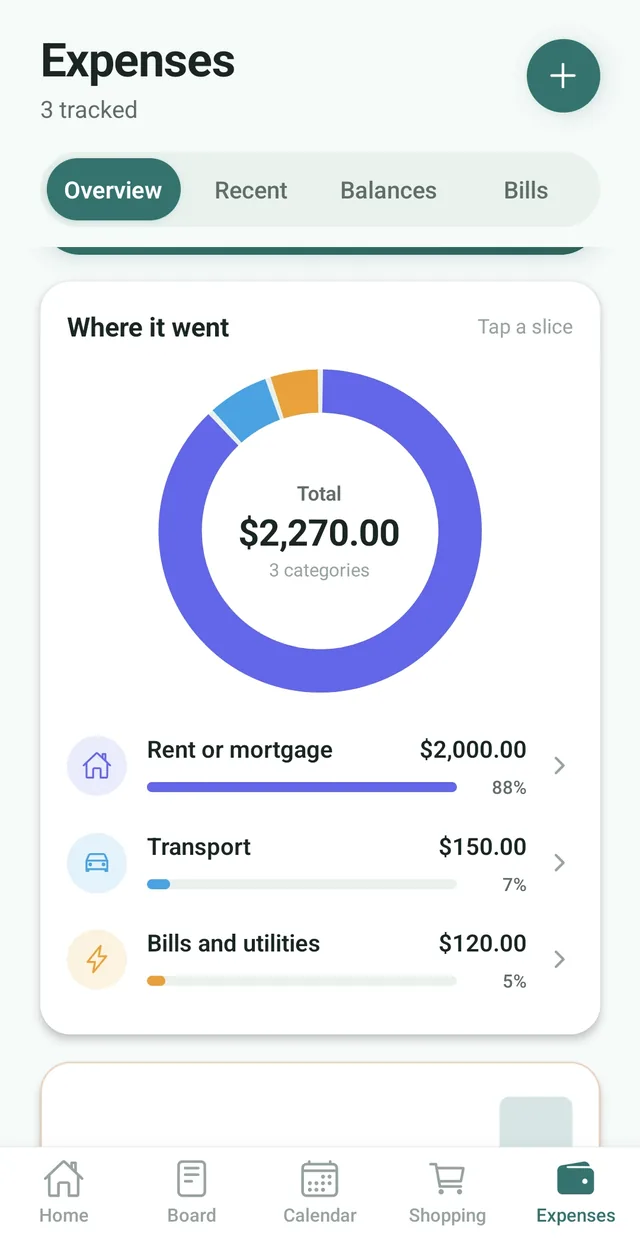
Once a week or once a month, open the overview. Look at the total for the month, how it compares with last month and which categories took the biggest share. A chart is faster to read than a list, and tapping a category to see the expenses behind it answers most “what was that?” questions.
Step 5: Settle up regularly
If one person pays for most shared costs, balances build up. Settle up on a schedule, such as monthly, so it never turns into an awkward conversation. A balance view that shows who is owed and who owes, and suggests the fewest payments to settle, makes it quick.
The bottom line
Tracking family spending is a small habit with a big payoff. Record expenses as they happen, keep categories broad, separate shared costs from your own, look at the overview together and settle up on a schedule.
Frequently asked questions
How do I track family spending?
Record each expense when it happens, give it a broad category, decide whether it is shared or your own, then look at the overview each week or month to see where the money went and how it compares with last month.
What is the easiest way to track household expenses?
Use one shared app where everyone adds expenses from their own phone. In Nest, tap Expenses, add what was spent and let Nest suggest the category.
What expense categories should I use?
About a dozen broad ones: groceries, rent or mortgage, bills and utilities, transport, eating out, kids, health, insurance, entertainment, shopping, travel and other.
How do I separate shared costs from personal spending?
Split shared costs so the balance shows who owes who, and record personal spending as your own so it counts in your totals without creating a debt. In Nest these are Split with the family and Just record it.
Is the Nest expense tracker free?
Yes. Adding expenses, 12 categories, Recent, Balances, the month total with its comparison with last month and the top three categories are free. Budgets, bills, insights and the full Overview come with Nest Premium.